Retail & office displays
Digital Signage Assistant
Drag, drop, done.
A simple drag-and-drop content tool for Sharp digital signage displays.
- Who uses it
- Store owners and non-technical operators
- Skill level
- Beginner
- Scale
- One counter
- Scene
- Retail & office displays
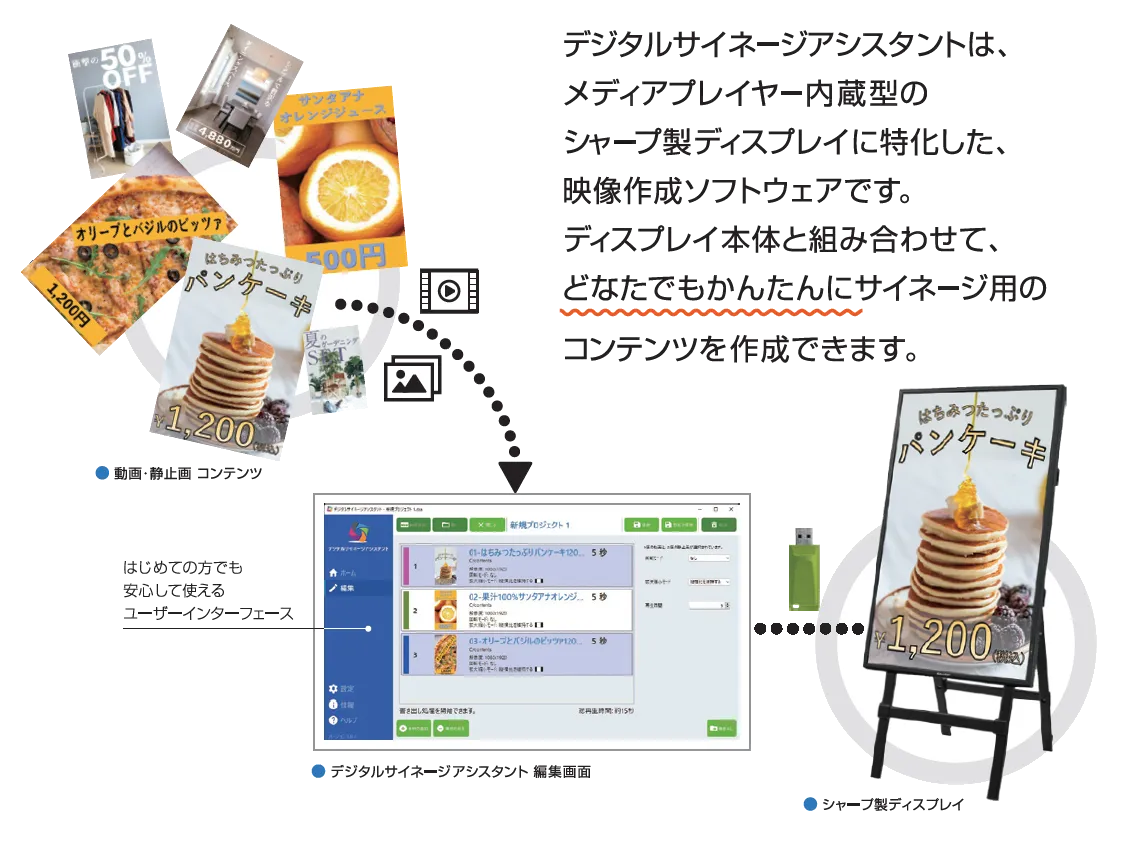
Before / After
The problem
Producing signage content required video-editing expertise. Aligning resolutions and re-sequencing material took hours by hand.
The change
Drag-and-drop ordering plus automatic scaling do the work for you. Export to USB, plug it in, and the Sharp display plays.
Common concerns, and how we answer them
Common concerns, and how we answer them
The questions we actually hear during evaluation — and how the product addresses each one.
- Concern
Without video-editing experience on staff, only a handful of people would actually be able to use it.
Our answerThe only interaction is drag and drop. A jargon-free UI lets store owners and non-technical operators refresh content the same day.
- Concern
Mixed source resolutions mean every refresh stalls on manual resizing.
Our answerMaterial is auto-scaled to fit the output display — no pre-processing required.
- Concern
Mandatory cloud subscriptions and always-on connectivity raise both cost and reliability worries.
Our answerThe workflow ends at a USB stick. No network or cloud account is required, and there is no recurring monthly fee.
- Concern
Portrait installations break the image and end up needing a specialist anyway.
Our answer90° rotated output is built in for Sharp's vertical installations. The same workflow works regardless of mounting orientation.
- Concern
We would rather not adopt a system without a proven track record.
Our answerDSA is deployed at many private-sector companies and used in daily signage operations.
Products
Digital Signage Assistant (DSA) is a content authoring tool that combines videos and stills into a single playable file — purely through drag and drop. It is optimized for Sharp displays, including 90° rotation for portrait installations.
Export to a USB stick and you are on air the same day. No specialized knowledge required, so store owners and non-technical operators can refresh content as easily as moving a file.
Why Liberal Logic
Why Liberal Logic
Drag-and-drop authoring
Reorder videos and stills with the mouse — that's the whole interaction.
Automatic scaling
Mixed-resolution assets fit themselves to the target display.
Portrait support
90° rotation for Sharp displays installed vertically.
USB delivery
Export to USB and plug it in — no cloud, no network setup required.
Considering a deployment?
From product selection to operations design — our team is here to help.
Get in touch